Land Development Model
Evaluate land acquisition, infrastructure costs, phased plot sales, debt repayment and profit.
€79One payment · VAT included
Buy nowFinancial Model for Excel
Budget managed construction spend, fee accrual, retention, payroll and working capital.

Secure checkout · Digital download
Follow earned fees, retained cash, payroll and completion receipts month by month. See the management profit and the funding needed before the work is complete.
One currency for all project amounts. Changing it changes labels, not values.
Your base case. Management profit: $319,000.
Monthly fee receipts cover the modelled delivery costs without a cumulative month-end cash deficit.
This models the development manager’s fee business, not the property investment. No property IRR or investor return is calculated.
Working capital is measured at month end; intra-month payroll timing, payment delays, borrowing costs and tax are not included.
A 1–36 month fee-business forecast with evenly phased project work, fixed monthly payroll and overhead, retained fees and a completion bonus. It does not model the property’s construction funding, debt, tax or investment IRR.
Managed construction spend is phased evenly over 1–36 months. Base fees earned each month = managed budget ÷ duration × management fee rate. The managed budget is not a cash expense of the management business.
Monthly fee receipts = monthly base fees × (1 − retention). In the final month, add the full retained base fees and the additional completion fee. Payroll and overhead are paid every active month.
Net management cash flow = fee receipts − payroll − overhead. Management profit = total fees including the completion fee − all delivery costs. Profit margin divides profit by total fees, where fees are positive.
Peak funding = the magnitude of the lowest cumulative month-end cash balance, with a floor of zero. No opening cash, debt or intra-month timing is assumed. A loss-making mandate can retain a permanent deficit.
Break-even fee = max(0, (total delivery costs − completion fee) ÷ managed budget). The sensitivity changes duration and fee rate while holding budget and monthly costs fixed, matching the workbook’s profit sensitivity logic.
Illustrative example, not a market forecast. All project amounts use USD. A dash means the measure is not applicable or a unique return cannot be established.
Enter the managed construction budget, fee percentage, duration, retention, completion fee, payroll and overhead.
Review monthly fee accrual, collections, delivery costs and working capital in the Forecast. The included duration is 1–36 months.
Compare the base and downside assumptions, review the sensitivity analysis and follow the effect through the workbook.
Explore all 6 worksheets.
Version 1.4 · Updated 6 October 2026.
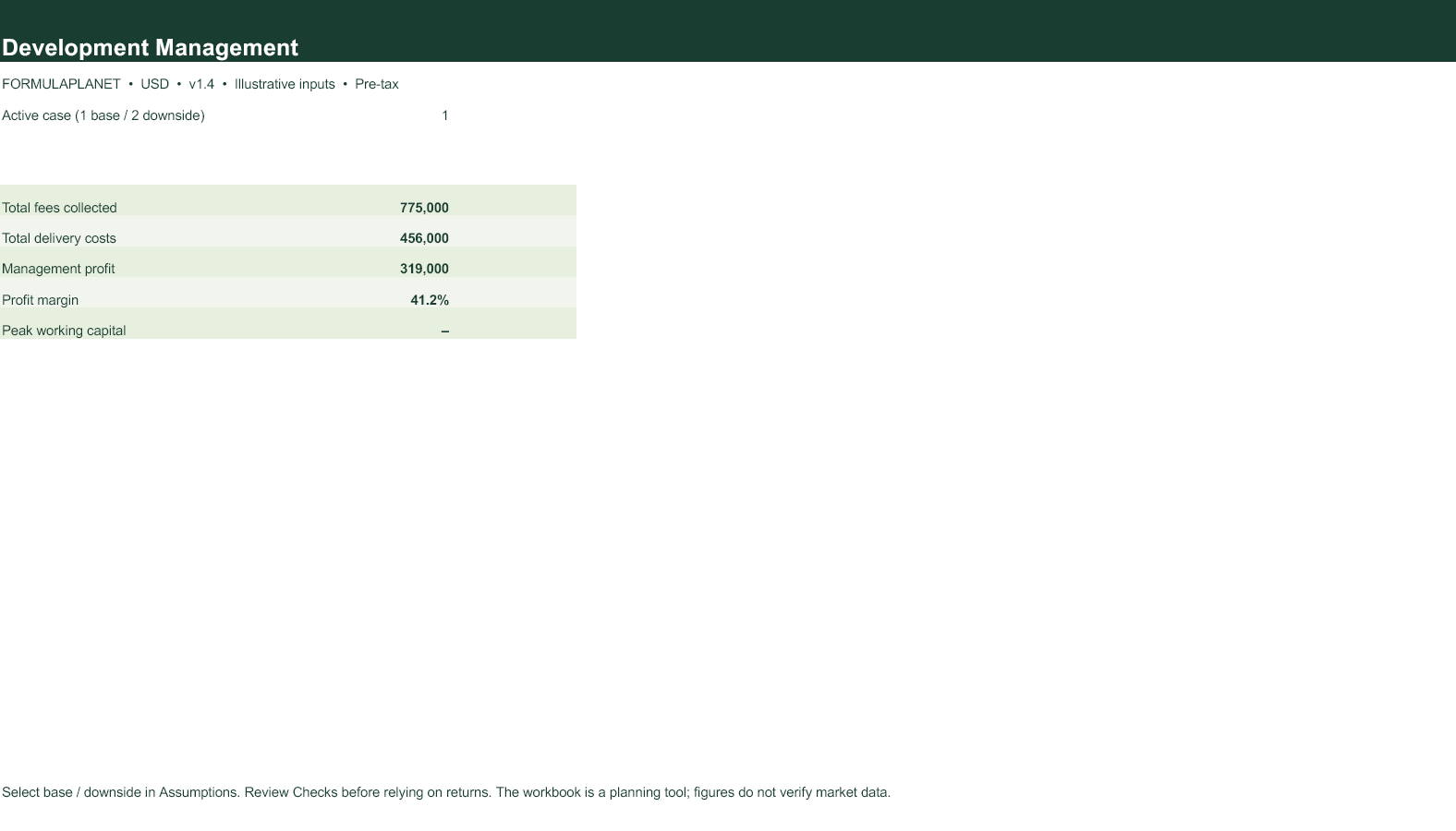
Read-only, saved illustrative workbook values. The displayed currency stays as saved and is independent of the calculator and payment currency.
An operating model for a development management business or mandate. It phases managed construction spend, calculates management fees and retention, deducts delivery costs and tracks working capital through completion.
Your editable .xlsx file includes the complete workbook below. Open it in desktop Microsoft Excel and replace the worked example with your project.
The Checks sheet reconciles collected fees with the fee entitlement and phased expenditure with the construction budget. Outputs cover management profit and working capital; this workbook does not present property investment IRR.
Development managers · Project managers · Developers · Investors · Finance teams.
Editable .xlsx · 6 worksheets · One organisation, unlimited projects.
Digital download · Your Excel file is emailed after payment.
An operating model for a development management business or mandate. It phases managed construction spend, calculates management fees and retention, deducts delivery costs and tracks working capital through completion.
An editable .xlsx workbook with Dashboard, Assumptions, Forecast, Sensitivity, Checks, ReadMe worksheets.
Yes. The workbook licence covers internal and client analysis for one organisation, without a subscription. Reselling or redistributing the template is excluded.
Choose USD, EUR, GBP, INR (Indian rupee), CAD, AUD, NZD, CHF, JPY or AED in Assumptions!I6. USD is the default. All monetary inputs and outputs use one project currency. Changing the selector updates currency labels without converting amounts; replace the example inputs with local project data. Your workbook currency is independent of the currency you pay in.
No. Calculations use visible spreadsheet formulas and the file contains no VBA.
Enter the managed construction budget, fee percentage, duration, retention, completion fee, payroll and overhead. Input cells are visually distinguished from formulas; follow the ReadMe instructions.
Yes. Use the base/downside case selector and review the workbook’s Sensitivity sheet. The available assumptions depend on the model.
The Checks sheet reconciles collected fees with the fee entitlement and phased expenditure with the construction budget. Outputs cover management profit and working capital; this workbook does not present property investment IRR.
Defaults are illustrative, not current market evidence. Replace and independently verify them for every live transaction.
Use a current desktop release of Microsoft Excel. LibreOffice may format or calculate some financial functions differently.
Your order confirmation provides the purchased workbook, currently v1.4, updated 6 October 2026.


All 21 editable Excel workbooks. Development, acquisition, financing, equity and valuation in one collection.
Evaluate land acquisition, infrastructure costs, phased plot sales, debt repayment and profit.
Underwrite residential development from land acquisition through construction, lease-up, refinancing and exit.
Connect room strategy, construction costs, operating performance, financing and exit returns.
Size a construction facility and create a monthly debt draw, interest and maturity schedule.
Estimate hard construction cost from gross area, unit cost and contingency.
Measure development profit as a percentage of gross or net development value.
Calculate development profit after all land, construction, finance and selling costs.