
Preferred Equity Model
Track preferred return accrual, capital return and residual value ahead of common equity.
€49One payment · VAT included
Buy nowFinancial Model for Excel
Allocate whole-deal cash flow between LP and GP through preferred return and promote tiers.


Secure checkout · Digital download
A five-year European whole-deal waterfall with compounded preference, return of capital and three genuine promote tiers.
One currency for all project amounts. Changing it changes labels, not values.
Your base case. LP contribution: $3,600,000.
The available cash covers the preferred claims. Residual distributions follow the three entered LP/GP splits and the running LP hurdle balances.
Five annual periods, matching the current workbook; all distributable cash must already be after property-level debt and costs.
IRR is unavailable for a partner with no initial contribution, no positive receipt or no unique rate. No catch-up, clawback, tax allocation or additional capital calls are assumed.
A five-year annual European whole-deal LP/GP example based on the current workbook’s distribution formulas. One recurring annual cash input and one final-year exit input keep the online example compact. Three promote tiers; no catch-up or clawback. Property-level debt, taxes, transaction documents and subsequent capital calls are outside the example. The online sensitivity reruns partner IRR, while the workbook’s separate Sensitivity sheet isolates gross asset value.
All capital is contributed at year 0. Each year’s operating cash is entered after property debt and costs; the final year adds the entered net equity exit cash.
Preference compounds annually on outstanding LP / preferred capital plus unpaid preference. Available cash pays preference first, then LP / preferred capital.
At year 5, GP capital is returned next. Remaining cash goes through tier 1 to the second LP hurdle, tier 2 to the third LP hurdle, then the residual split. Separate hurdle balances compound and deduct all prior LP distributions.
Each promote tier uses the entered LP share; the GP receives the remainder. A 0% LP share allocates that tier’s available residual to the GP, matching the workbook’s zero-split treatment.
Partner distributions are constrained to available cash. Annual IRR and multiple use actual partner contributions and distributions, excluding unpaid claims.
Illustrative example, not a market forecast. All project amounts use USD. A dash means the measure is not applicable or a unique return cannot be established.
Enter LP and GP contributions, equity cash available after property-level debt, preferred return and promote assumptions.
Review the whole-deal Waterfall: preference, return of capital, promote tiers and partner-level distributions.
Compare the base and downside assumptions, review the sensitivity analysis and follow the effect through the workbook.
Explore all 6 worksheets.
Version 1.4 · Updated 6 October 2026.
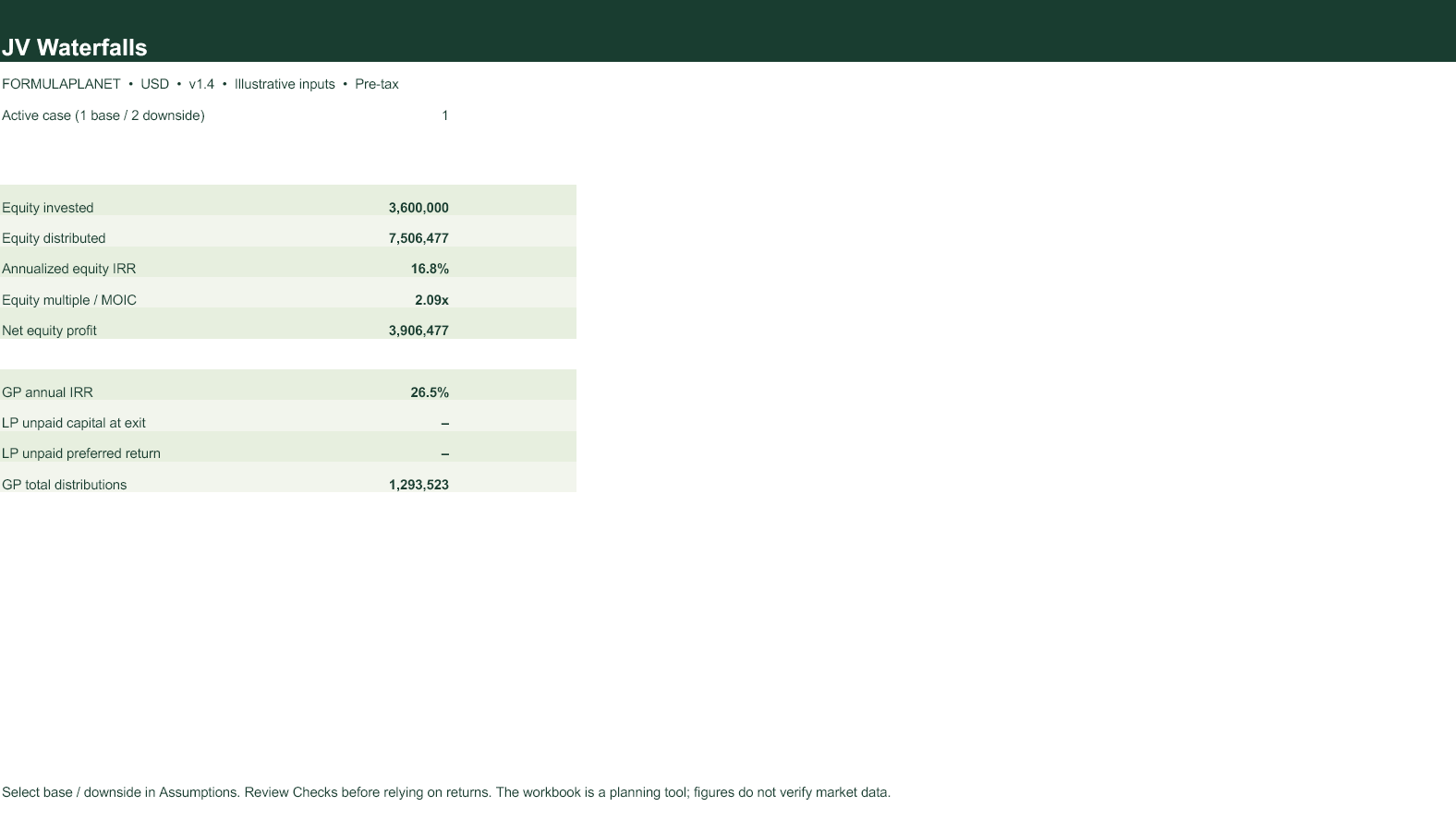
Read-only, saved illustrative workbook values. The displayed currency stays as saved and is independent of the calculator and payment currency.
A European-style whole-deal waterfall. It models LP and GP contributions, compounded preference, capital return and three promote tiers, then reconciles total distributable cash to partner distributions.
Your editable .xlsx file includes the complete workbook below. Open it in desktop Microsoft Excel and replace the worked example with your project.
The Checks sheet reconciles available cash to partner distributions, LP capital and accrued preference, and checks the dashboard IRR calculation. The included European-style waterfall has no catch-up or clawback.
Sponsors · Private equity firms · Family offices · Fund managers · Investment analysts.
Editable .xlsx · 6 worksheets · One organisation, unlimited projects.
Digital download · Your Excel file is emailed after payment.
A European-style whole-deal waterfall. It models LP and GP contributions, compounded preference, capital return and three promote tiers, then reconciles total distributable cash to partner distributions.
An editable .xlsx workbook with Dashboard, Assumptions, Waterfall, Sensitivity, Checks, ReadMe worksheets.
Yes. The workbook licence covers internal and client analysis for one organisation, without a subscription. Reselling or redistributing the template is excluded.
Choose USD, EUR, GBP, INR (Indian rupee), CAD, AUD, NZD, CHF, JPY or AED in Assumptions!I6. USD is the default. All monetary inputs and outputs use one project currency. Changing the selector updates currency labels without converting amounts; replace the example inputs with local project data. Your workbook currency is independent of the currency you pay in.
No. Calculations use visible spreadsheet formulas and the file contains no VBA.
Enter LP and GP contributions, equity cash available after property-level debt, preferred return and promote assumptions. Input cells are visually distinguished from formulas; follow the ReadMe instructions.
Yes. Use the base/downside case selector and review the workbook’s Sensitivity sheet. The available assumptions depend on the model.
The Checks sheet reconciles available cash to partner distributions, LP capital and accrued preference, and checks the dashboard IRR calculation. The included European-style waterfall has no catch-up or clawback.
Defaults are illustrative, not current market evidence. Replace and independently verify them for every live transaction.
Use a current desktop release of Microsoft Excel. LibreOffice may format or calculate some financial functions differently.
Your order confirmation provides the purchased workbook, currently v1.4, updated 6 October 2026.


All 21 editable Excel workbooks. Development, acquisition, financing, equity and valuation in one collection.
Track preferred return accrual, capital return and residual value ahead of common equity.

Analyse current-pay and PIK mezzanine returns behind senior debt.
Underwrite residential development from land acquisition through construction, lease-up, refinancing and exit.
Connect room strategy, construction costs, operating performance, financing and exit returns.
Split available cash between LP and GP after preferred return and capital return.
Calculate compounded preferred return on outstanding investor capital.
Calculate sponsor promote from residual profit and promote percentage.
Allocate an equity requirement between sponsor and investor contributions.
Compare total equity distributions, including returned capital, with total equity contributions.