
Acquisition Financing Model
Calculate acquisition loan capacity, amortisation, debt service, fees and equity funding.
€49One payment · VAT included
Buy nowFinancial Model for Excel
Size a replacement loan and quantify proceeds, debt service, lender return and maturity balance.


Secure checkout · Digital download
Test all four lender constraints, then follow interest, repayment and the maturity balance through the schedule.
One currency for all project amounts. Changing it changes labels, not values.
Your base case. Sized loan commitment: $8,400,000.
The LTC limit binds. Monthly amortisation reduces principal, but the remaining balance must be repaid or refinanced at maturity.
All figures are pre-tax and in one project currency. No market assumptions or loan offers are implied.
A compact financing example based on the workbook’s four sizing constraints and monthly debt formulas, for a term of 1–60 months. Monthly amortisation with a term balloon; no interest-only switch, prepayment or default recovery model. The sensitivity grid reruns the online loan sizing, while the Excel Sensitivity sheet separately isolates gross asset value. This is not the full workbook or a lender commitment.
The commitment is the minimum of property value × maximum LTV, eligible cost × maximum LTC, NOI ÷ minimum DSCR ÷ annual debt constant, and NOI ÷ minimum debt yield.
For an amortising loan, the annual debt constant is 12 monthly payments on one unit of debt. A zero-interest loan repays principal evenly over the amortisation period.
The loan is advanced at closing. Monthly interest uses opening principal; the scheduled payment first pays interest, then principal. Remaining principal is repaid at the end of the term.
The origination fee is paid at month 0. Lender IRR uses the monthly cash flows and is annualised as (1 + monthly IRR)^12 − 1; it is unavailable if a unique rate cannot be established.
Illustrative example, not a market forecast. All project amounts use USD. A dash means the measure is not applicable or a unique return cannot be established.
Enter property value, NOI, existing debt payoff, lender sizing limits, loan term, interest and refinancing fees.
Review the Debt schedule and Lender sheets for commitment, draws, interest, principal repayment and the maturity balloon.
Compare the base and downside assumptions, review the sensitivity analysis and follow the effect through the workbook.
Explore all 7 worksheets.
Version 1.4 · Updated 6 October 2026.
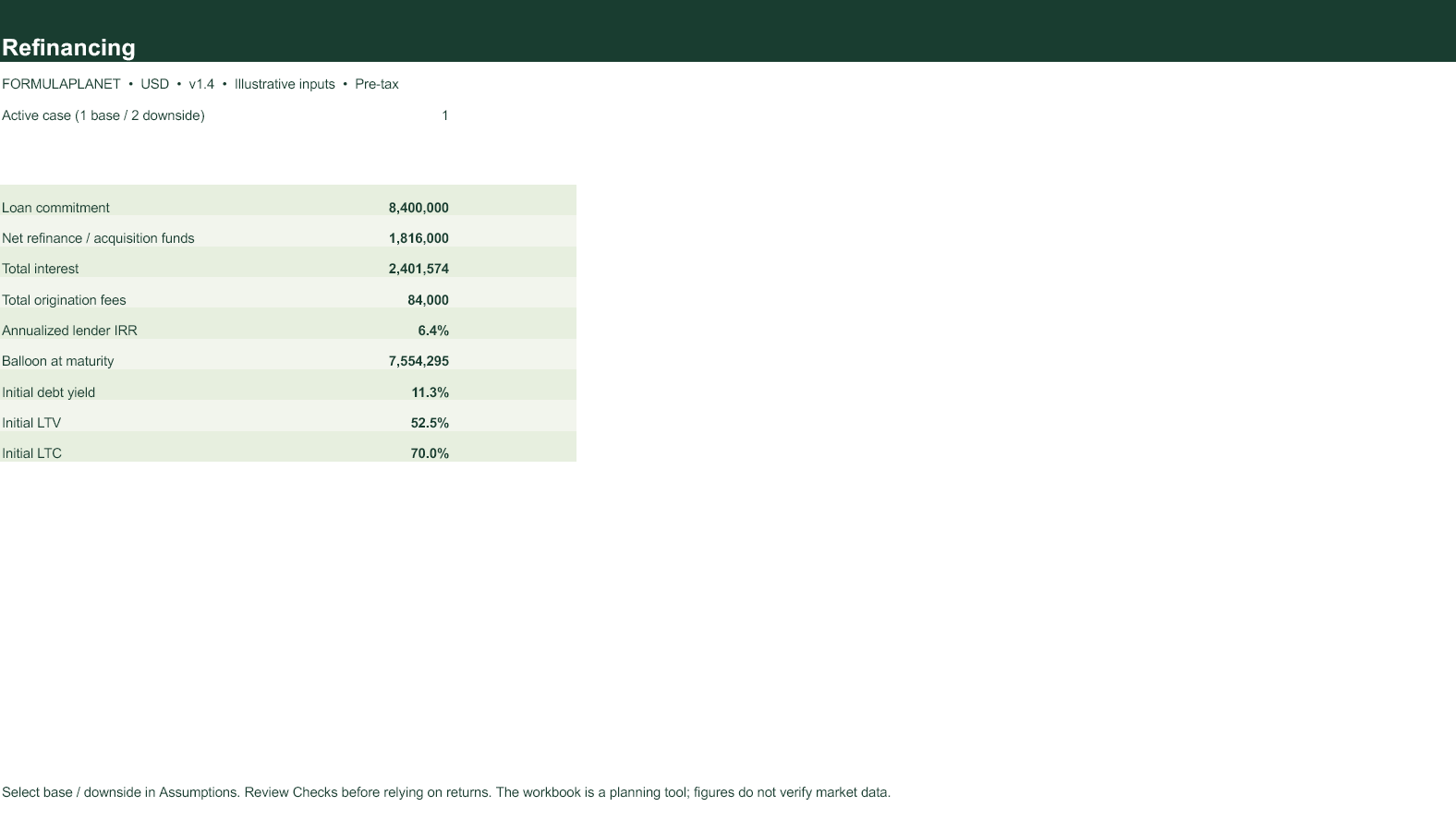
Read-only, saved illustrative workbook values. The displayed currency stays as saved and is independent of the calculator and payment currency.
A refinancing model that sizes proceeds against property value, eligible cost, DSCR and debt yield. It includes the payoff of existing debt, origination fees, monthly amortisation and a term balloon.
Your editable .xlsx file includes the complete workbook below. Open it in desktop Microsoft Excel and replace the worked example with your project.
The Checks sheet reconciles the debt roll-forward and maturity principal, checks that commitment is not overdrawn, and reviews the dashboard IRR calculation. Interest is equity-funded; capitalised interest reserves are excluded.
Property owners · Investors · Lenders · Debt advisers · Analysts.
Editable .xlsx · 7 worksheets · One organisation, unlimited projects.
Digital download · Your Excel file is emailed after payment.
A refinancing model that sizes proceeds against property value, eligible cost, DSCR and debt yield. It includes the payoff of existing debt, origination fees, monthly amortisation and a term balloon.
An editable .xlsx workbook with Dashboard, Assumptions, Debt schedule, Lender, Sensitivity, Checks, ReadMe worksheets.
Yes. The workbook licence covers internal and client analysis for one organisation, without a subscription. Reselling or redistributing the template is excluded.
Choose USD, EUR, GBP, INR (Indian rupee), CAD, AUD, NZD, CHF, JPY or AED in Assumptions!I6. USD is the default. All monetary inputs and outputs use one project currency. Changing the selector updates currency labels without converting amounts; replace the example inputs with local project data. Your workbook currency is independent of the currency you pay in.
No. Calculations use visible spreadsheet formulas and the file contains no VBA.
Enter property value, NOI, existing debt payoff, lender sizing limits, loan term, interest and refinancing fees. Input cells are visually distinguished from formulas; follow the ReadMe instructions.
Yes. Use the base/downside case selector and review the workbook’s Sensitivity sheet. The available assumptions depend on the model.
The Checks sheet reconciles the debt roll-forward and maturity principal, checks that commitment is not overdrawn, and reviews the dashboard IRR calculation. Interest is equity-funded; capitalised interest reserves are excluded.
Defaults are illustrative, not current market evidence. Replace and independently verify them for every live transaction.
Use a current desktop release of Microsoft Excel. LibreOffice may format or calculate some financial functions differently.
Your order confirmation provides the purchased workbook, currently v1.4, updated 6 October 2026.



All 21 editable Excel workbooks. Development, acquisition, financing, equity and valuation in one collection.
Calculate acquisition loan capacity, amortisation, debt service, fees and equity funding.

Size a construction facility and create a monthly debt draw, interest and maturity schedule.

Translate sustainable rent and operating costs into direct capitalisation and DCF values.

Track preferred return accrual, capital return and residual value ahead of common equity.
Size the tightest loan amount under LTV, LTC, debt-yield and DSCR constraints.
Measure outstanding debt against current property value.
Compare annual NOI or cash available for debt service with annual debt service.
Measure annual NOI against the outstanding loan balance.
Calculate monthly principal and interest for a fully amortising loan.